close
Choose Your Site
Global
Social Media

Views: 0 Author: Site Editor Publish Time: 2025-09-03 Origin: Site
In today's fast-paced woodworking industry, precision and efficiency are paramount. Are CNC router machines the answer to these demands? These computer-controlled tools offer unparalleled accuracy and versatility in crafting intricate designs. In this post, you'll learn why CNC routers are worth considering for your workshop, exploring their benefits and transformative impact on woodworking.
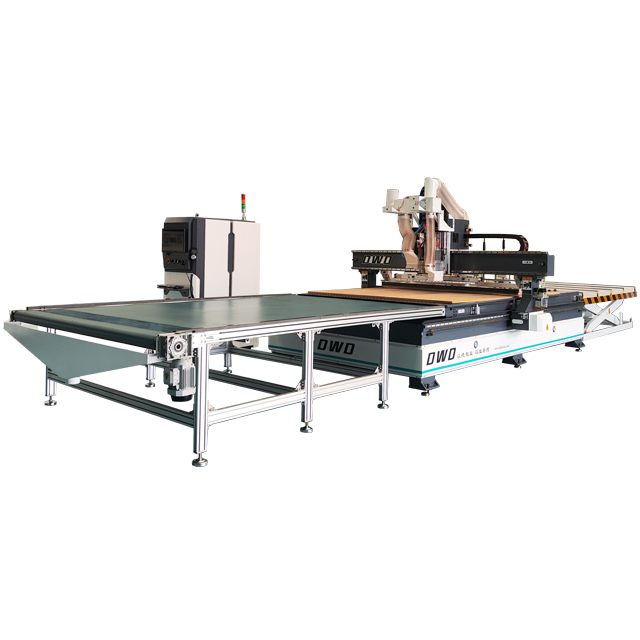
A CNC router machine is a computer-controlled cutting tool used to carve, cut, and shape various materials, primarily wood. Unlike traditional routers, which require manual operation, CNC routers follow programmed instructions to create precise and intricate designs. These machines are widely used in woodworking workshops for producing furniture parts, decorative panels, signs, and prototypes with consistent accuracy.
CNC stands for Computer Numerical Control. This means the machine operates based on numerical data programmed into a computer, eliminating much of the guesswork and human error common in manual routing. The router typically consists of a spindle that holds the cutting tool, a worktable to secure the material, and motors that move the spindle along multiple axes (usually X, Y, and Z).
CNC routers operate by following a set of coded instructions, usually written in G-code, which tells the machine how to move, how fast to cut, and where to cut. The process begins with the creation of a digital design, often using CAD (Computer-Aided Design) software. This design is then converted into a toolpath using CAM (Computer-Aided Manufacturing) software, which generates the G-code.
Once the program loads into the CNC router's control system, the machine moves the cutting tool along the programmed path. It can cut complex shapes, engrave detailed patterns, and produce 3D carvings by moving the spindle in precise increments. The router's motors control the movement on the X (left-right), Y (forward-back), and Z (up-down) axes, allowing for three-dimensional shaping.
The machine clamps the wood or other materials securely on the worktable to prevent movement during cutting. Advanced CNC routers may also include features like automatic tool changers, dust collection systems, and vacuum tables to hold material in place without clamps.
Because the cutting process is automated, CNC routers deliver high precision and repeatability, making them ideal for both small-scale custom work and large production runs. They reduce waste by optimizing material use and minimize labor by automating complex cuts.
Tip: When selecting a CNC router, ensure your workshop has compatible CAD/CAM software and that operators receive proper training to maximize machine efficiency and precision.
CNC routers dramatically boost efficiency in woodworking shops. They automate cutting and shaping tasks, completing jobs faster than manual methods. By following exact digital instructions, they maintain consistent precision across every piece. This reduces errors and waste, saving both time and materials. For example, a CNC router can replicate intricate designs repeatedly without variation, which is difficult to achieve manually. The ability to work continuously without fatigue also means more output in less time.
Adding a CNC router lowers labor costs significantly. Since the machine performs complex cuts automatically, it reduces the need for skilled manual labor. Operators mainly handle setup, programming, and supervision, freeing them to focus on other tasks. This shift can decrease the number of workers needed for production or allow existing staff to increase productivity. Over time, the savings on wages and reduced rework costs help offset the initial investment in the router.
CNC routers offer great versatility for woodworking projects. They can cut, carve, and engrave a variety of wood types and thicknesses. This flexibility allows woodworkers to create diverse products—from simple furniture parts to elaborate 3D sculptures. The machine’s programmable nature means designs can be quickly changed or customized without physical tooling adjustments. This adaptability supports both small custom orders and large production runs, expanding a workshop’s capabilities and market reach.
Tip: To maximize benefits, choose a CNC router that matches your workshop’s production volume and design complexity, ensuring efficient use and faster ROI.
CNC routers have transformed furniture design and manufacturing. They enable woodworkers to create complex shapes and precise joints that are difficult to achieve by hand. From custom cabinetry to detailed chair components, CNC routers cut parts consistently and quickly. This precision ensures perfect fitting pieces and reduces assembly time. The ability to replicate designs exactly means batch production becomes more efficient, while custom orders remain feasible. Manufacturers can also experiment with intricate inlays, engravings, and patterns, adding unique value to their products.
Sign making benefits greatly from CNC routers. These machines carve letters, logos, and graphics into wood, MDF, or composite materials with sharp detail and clean edges. CNC routers can produce dimensional signs, engraving deep or shallow cuts depending on the design needs. For prototyping, CNC routers allow rapid testing of design concepts before full-scale production. This reduces time and material waste while improving design accuracy. Small businesses and artisans often use CNC routers to create personalized signs and promotional products that stand out.
CNC routers excel at producing 3D sculptures and art installations. Their multi-axis movement allows carving of complex three-dimensional forms from solid wood blocks or layered materials. Artists and fabricators can bring digital models to life with high fidelity, capturing fine details and smooth contours. This capability opens new creative possibilities in architectural elements, decorative panels, and public art. CNC routers also speed up production of repetitive sculptural elements, maintaining consistency across large projects. The technology bridges traditional woodworking artistry and modern digital fabrication.
Tip: When using CNC routers for detailed art or signage, choose machines with high spindle speeds and advanced software compatibility to achieve smoother finishes and intricate designs.
Investing in a CNC router requires careful budgeting. The initial cost includes the machine price, software licenses, and installation fees. CNC routers range from small desktop models costing a few thousand dollars to large industrial machines that can exceed tens of thousands. Besides the router itself, you need compatible CAD/CAM software to design and program your projects, which may require additional licenses or subscriptions.
Setup costs also cover training operators to use the machine efficiently and safely. Some manufacturers provide onsite installation and training, which can add to the upfront expense but ensures faster integration into your workflow. Additionally, consider workspace modifications like dust collection systems or power upgrades to support the machine.
Though the upfront cost can be significant, CNC routers often yield long-term savings. Their precision reduces material waste, lowering raw material expenses. Automation cuts down labor hours, allowing staff to focus on other tasks or reduce overtime. This efficiency can increase production capacity without hiring more workers.
Return on investment (ROI) depends on your workshop’s volume and project complexity. For example, repetitive batch production benefits greatly from CNC automation. Custom shops may see ROI through faster turnaround and higher-quality outputs, leading to more satisfied clients and repeat business.
Maintenance and minimal downtime also contribute to savings. Modern CNC routers are designed for durability and low upkeep, helping you avoid costly repairs or interruptions.
Traditional woodworking tools have lower initial costs but can be less efficient and precise. Manual routing requires skilled labor, which adds to ongoing expenses. Mistakes and material waste are more common, increasing overall costs.
CNC routers, despite their higher upfront price, offer consistent accuracy and repeatability, reducing errors. They handle complex designs that would be time-consuming or impossible by hand. This capability can open new market opportunities and justify the investment.
When comparing, factor in hidden costs of manual methods, such as longer production times, rework, and quality control challenges. CNC routers streamline processes, often leading to better profitability over time.
Tip: Calculate your expected production volume and project types before purchasing a CNC router to choose a model that balances initial cost with long-term savings and ROI.
Choosing the right CNC router is crucial for maximizing your woodworking workshop’s productivity and quality. Here are key factors to consider:
Size and Work Area: Match the router’s bed size to the typical dimensions of your projects. Larger beds accommodate bigger workpieces but require more space.
Spindle Power and Speed: Higher spindle power handles tougher woods and thicker materials. Variable speed control allows fine-tuning for different cuts.
Axis Configuration: Most routers have three axes (X, Y, Z), but some offer a fourth or fifth axis for complex 3D carving.
Software Compatibility: Ensure the router supports popular CAD/CAM software you plan to use, making design and programming easier.
Build Quality and Components: Look for machines with sturdy frames, quality linear guides, and reliable motors to ensure precision and durability.
Automation Features: Automatic tool changers, vacuum tables, and dust collection systems improve efficiency and ease of use.
Support and Training: Consider manufacturers offering installation, training, and ongoing technical support to help your team get up to speed quickly.
Several well-regarded CNC router brands cater to woodworking workshops of different sizes and budgets:
OMNI CNC: Known for quality and value, OMNI offers versatile routers suitable for furniture, signage, and 3D carving. They provide global installation and training services.
Mantech International: UK-based supplier with a wide range of routers, excellent customer support, and full training programs. Their machines fit small workshops to industrial setups.
CNC Masters: US manufacturer offering durable CNC mills and routers with user-friendly software. Ideal for shops needing metal and wood machining.
Other Notables: ShopBot, AXYZ, and Laguna Tools also provide a variety of CNC routers with strong reputations in woodworking.
Choosing a brand with a proven track record for reliability and service is critical.
Proper installation and training are essential for safe, efficient CNC router operation:
Installation: Professional setup ensures the machine is leveled, calibrated, and integrated with your workshop’s power and dust collection systems. Some suppliers offer onsite installation.
Operator Training: Training covers machine operation, software use, maintenance, and safety protocols. Hands-on sessions help operators gain confidence.
Ongoing Support: Access to technical support, software updates, and refresher training helps maintain productivity and troubleshoot issues quickly.
Investing in thorough installation and training reduces downtime and maximizes your CNC router’s benefits.
Tip: When selecting a CNC router, prioritize vendors that provide comprehensive installation and hands-on training to ensure your team can operate the machine safely and efficiently from day one.
Keeping a CNC router in top shape requires regular maintenance. Daily checks should include cleaning the work area and removing dust from the machine's moving parts. Dust and wood chips can clog the spindle, rails, and lead screws, causing wear or inaccuracies. Lubricate the linear guides and ball screws as per the manufacturer's recommendations to reduce friction and prevent rust.
Inspect belts, cables, and connectors regularly for signs of wear or damage. Tighten any loose bolts or screws to maintain machine stability. Check the spindle for unusual noise or vibration, which might indicate bearing wear or imbalance. Clean the cooling system and ensure the dust collection system is functioning properly to protect the machine and the operator.
Schedule deeper maintenance weekly or monthly, depending on usage. This may include checking the alignment of the axes, inspecting the tool holder for wear, and updating firmware or software to the latest versions. Keeping the software updated helps improve performance and security.
Even with proper care, CNC routers can encounter issues. Common problems include:
Inaccurate Cuts: Often caused by loose mechanical parts, worn components, or incorrect calibration. Recalibrate the machine and tighten all mechanical parts.
Spindle Overheating: Check for dust buildup, ensure proper lubrication, and verify cooling fans are working.
Software Glitches: Restart the control software or the machine. Check for updates or reinstall drivers if problems persist.
Material Slippage: Make sure clamps or vacuum hold-down systems are secure. Adjust the holding method if needed.
Unexpected Stops or Errors: Inspect electrical connections and emergency stop switches. Faulty wiring or sensors may cause interruptions.
Keeping a log of maintenance activities and issues helps identify recurring problems and plan preventive measures.
To maximize your CNC router’s lifespan and maintain performance, invest time in training operators on proper machine handling and maintenance routines. Avoid rushing setups or ignoring warning signs like unusual noises or inconsistent cuts.
Use high-quality tools and parts recommended by the manufacturer. Replace worn tools promptly to avoid damage to the spindle or workpiece. Maintain a clean, dust-free environment to protect sensitive electronics.
Consider environmental factors, such as humidity and temperature, which can affect machine components and wood material. A stable workshop environment reduces the risk of warping or corrosion.
Regular professional servicing can catch issues early and keep your router running smoothly. Following the manufacturer’s maintenance schedule and guidelines ensures your investment delivers consistent, high-quality results.
Tip: Establish a daily and weekly maintenance checklist for your CNC router to prevent downtime and extend machine life.
CNC routers significantly enhance woodworking workshops by improving efficiency, precision, and design versatility. They automate complex tasks, reduce labor costs, and support diverse projects. Investing in CNC router technology offers long-term savings and increased production capacity. DWD MECHATRONICS provides advanced CNC routers that deliver exceptional value with their precision, durability, and comprehensive support services. Their products enable workshops to achieve higher quality outputs and explore new creative possibilities, making them a worthwhile addition for any woodworking business.
A: A CNC Router Machine is used in woodworking for cutting, carving, and shaping materials like wood to create precise and intricate designs for furniture, signs, and art installations.
A: A CNC Router Machine improves efficiency by automating cutting tasks, reducing manual labor, and ensuring consistent precision, which minimizes errors and material waste.
A: Investing in a CNC Router Machine lowers labor costs, increases production capacity, and enables complex designs, offering long-term savings and expanded market opportunities.