close
Choose Your Site
Global
Social Media

Views: 0 Author: Site Editor Publish Time: 2025-10-09 Origin: Site
Imagine crafting intricate designs in wood with precision and ease. CNC wood routers make this possible, transforming woodworking across industries. However, like any advanced tool, they come with challenges. In this article, we address common CNC wood router problems and offer practical solutions. You'll learn how to maintain efficiency and ensure optimal performance in your woodworking projects.
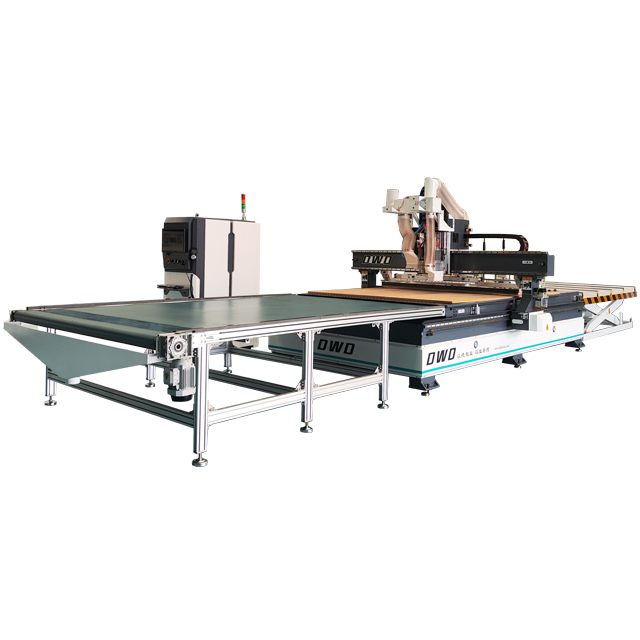
A CNC wood router combines mechanical precision and computer control to carve, cut, and shape wood products. Key components include:
Frame and Gantry: Provide structure and support movement.
Spindle: Holds and spins cutting tools at high speeds.
Motors and Drives: Control movement along X, Y, and Z axes.
Control System: The computer interface that executes programmed instructions.
Tool Changer (optional): Automatically swaps cutting tools for complex jobs.
Vacuum Table or Clamps: Secure the wood during machining.
The router works by following digital designs, moving the spindle to cut wood precisely. It translates G-code commands into physical motion, ensuring consistent, repeatable results.
CNC wood routers boast features enhancing productivity and precision:
High-Speed Spindles: Allow fast, clean cuts on various wood types.
Automatic Tool Changers: Reduce downtime by switching bits without manual intervention.
User-Friendly Software: Simplifies programming and operation, often with CAD/CAM integration.
Dust Collection Systems: Maintain a clean workspace and protect machinery.
Multi-Material Compatibility: Handle hardwood, softwood, plywood, MDF, and composites.
Repeatability: Produce identical parts efficiently, vital for mass production.
These capabilities make CNC routers indispensable in woodworking, furniture making, sign crafting, and more.
Tip: Regularly inspect and clean key components like spindles and motors to maintain your CNC router’s precision and extend its service life.
Alignment problems are among the most frequent challenges faced when operating CNC wood routers. Misalignment can cause inaccurate cuts, uneven edges, and parts that don’t fit together properly. Causes often include worn guide rails, loose screws, or incorrect calibration of the machine's axes. Even slight deviations in the X, Y, or Z axes can lead to significant errors in the final product.
CNC routers rely heavily on software to translate designs into precise movements. Programming errors, such as incorrect G-code, outdated software, or compatibility issues, may cause the machine to malfunction or produce flawed cuts. Operator mistakes during programming or using unsupported file formats can also disrupt operations, leading to wasted material and downtime.
Cutting tools like router bits wear down over time due to friction and heat. Dull or damaged tools reduce cutting quality, increase the risk of breakage, and strain the spindle motor. Frequent tool wear is common when working with hard or abrasive wood types, or if the feed rate and spindle speed are not properly adjusted.
Electrical issues such as faulty wiring, blown fuses, or motor failures can halt CNC router operations unexpectedly. Mechanical problems may involve worn belts, broken bearings, or damaged lead screws. These failures not only cause downtime but can also damage the workpiece or the machine itself if not addressed promptly.
Achieving a smooth, clean finish is critical in woodworking. Poor material finish often results from incorrect tool selection, improper feed rates, or insufficient spindle speed. Other factors include vibration during cutting, dull tools, or inadequate dust extraction, which can cause surface burns, tear-out, or rough edges.
Tip: Regularly check alignment and calibrate your CNC router to prevent costly errors and maintain cutting precision.
Proper alignment and calibration are crucial for CNC wood routers to produce accurate cuts. Begin by checking the machine’s axes for any signs of wear or looseness. Use precision tools like dial indicators or laser alignment systems to verify that the X, Y, and Z axes move correctly and consistently. Tighten any loose screws or bolts on the guide rails and gantry. Calibrate the machine by running test cuts and measuring the output against the design specifications. Adjust the software settings to compensate for any minor deviations found during testing. Regular calibration ensures that the router maintains its precision and prevents costly errors in production.
Software issues often cause CNC routers to misbehave or produce faulty cuts. Keep the router’s control software and firmware updated to the latest versions provided by the manufacturer. Updates often include bug fixes, improved compatibility, and new features. If errors occur, review the G-code for syntax mistakes or unsupported commands. Use simulation software to test programs before running them on the machine. Debugging tools can help identify where the program fails or causes unexpected behavior. Training operators on proper programming practices reduces human errors and maximizes machine efficiency.
Routine maintenance extends the life of your CNC wood router and improves performance. Clean dust and debris from the spindle, motors, and guide rails after each use. Inspect router bits regularly for signs of dullness, chipping, or damage. Replace worn tools promptly to prevent poor cuts and excessive motor strain. Lubricate moving parts according to the manufacturer’s recommendations to reduce friction and wear. Scheduled maintenance checks help catch issues early, minimizing downtime and repair costs.
Electrical problems can cause sudden machine stoppages or inconsistent operation. Inspect wiring and connectors for loose connections, corrosion, or damage. Check fuses and circuit breakers to ensure they are intact and functioning. Use a multimeter to test motor windings and control boards for electrical continuity. If the spindle motor fails to start or runs erratically, consult the machine’s manual for troubleshooting steps or contact technical support. Prevent electrical failures by maintaining a clean, dry environment and avoiding power surges with surge protectors.
Achieving a high-quality finish requires fine-tuning several factors. Select the appropriate router bit type and size for the wood species and cut style. Adjust feed rates and spindle speeds to balance cutting efficiency and surface smoothness. Reduce vibration by securing the workpiece firmly using clamps or vacuum tables. Use dust collection systems to keep the cutting area clear, preventing surface burns or tear-out caused by debris. For delicate finishes, consider multiple shallow passes rather than a single deep cut. Experiment with different tool paths and finishing passes to optimize results for your specific projects.
Tip: Schedule regular calibration and software updates to keep your CNC wood router running smoothly and avoid costly production errors.
Setting up a clear maintenance schedule is key to keeping your CNC wood router in top shape. Plan routine checks based on the machine’s usage frequency and manufacturer recommendations. For example, daily inspections might include cleaning dust and debris, while weekly or monthly tasks could involve lubrication and component checks. A well-structured schedule helps catch issues early, reducing downtime and costly repairs.
Regular inspections ensure all parts function smoothly. Check guide rails, belts, and screws for wear or looseness. Clean the spindle, motors, and work area to prevent dust buildup, which can affect performance and cause overheating. Use compressed air or vacuum systems to clear hard-to-reach areas. Keeping the machine clean not only improves precision but also extends its lifespan.
Lubrication reduces friction on moving parts like bearings and lead screws, preventing premature wear. Follow the manufacturer’s guidelines for the type and frequency of lubricant application. Cooling systems, such as air or liquid coolants, keep the spindle and motors from overheating during long runs. Proper cooling maintains tool sharpness and machine accuracy, especially during heavy or continuous use.
Over time, parts like belts, bearings, and router bits wear down. Regularly inspect these components and replace them before failure occurs. Worn belts can cause slipping and misalignment, while damaged bearings lead to vibrations and rough cuts. Keeping replacement parts on hand reduces downtime. Tracking component life cycles helps plan maintenance and budget for replacements effectively.
Tip: Create a detailed maintenance log to track inspections, lubrication, and part replacements, ensuring consistent care and early problem detection for your CNC wood router.
Software plays a crucial role in CNC wood router performance. Upgrading control software and CAM programs can unlock new features, improve compatibility, and enhance precision. Modern software often includes better user interfaces, simulation tools, and error-checking capabilities, reducing programming mistakes. For example, updates might add support for newer file formats or optimize tool paths for faster cutting. Staying current with software ensures your router works efficiently and adapts to evolving project demands.
Automation boosts productivity by reducing manual intervention. Adding features like automatic tool changers, material loading systems, or robotic arms can speed up production and minimize errors. Automation also allows continuous operation, especially in high-volume environments. For instance, an automatic tool changer swaps bits quickly during complex jobs, cutting downtime. Integrating sensors and feedback systems helps monitor machine health, alerting operators to maintenance needs before failures occur. These upgrades streamline workflows and increase output consistency.
Every woodworking operation has unique requirements. Customizing CNC routers lets you tailor machines for your projects. Options include adjusting table size, spindle power, or axis configurations. You might add specialized fixtures for particular materials or modify software for custom tool paths. Some manufacturers offer modular designs that can expand as your business grows. Custom solutions improve efficiency by matching machine capabilities precisely to your production goals, reducing waste and setup time.
High-quality parts enhance durability and accuracy. Premium spindles, motors, and linear guides reduce wear and vibration, resulting in cleaner cuts and longer machine life. Brands like HSD and Yaskawa are known for reliable components widely used in professional CNC routers. Upgrading to better components can also improve machine speed and reduce maintenance frequency. While initial costs may be higher, investing in quality pays off by lowering downtime and repair expenses over time.
Tip: Regularly evaluate your CNC router’s software and hardware to identify upgrade opportunities that boost efficiency and precision.
Choosing the right CNC wood router starts by understanding your specific needs. Consider the type of material you’ll work on—hardwoods like oak require different capabilities than softwoods or MDF. The volume of production matters too. For low to medium runs, a 3-axis router might suffice. For high-volume or complex 3D shapes, a 4- or 5-axis machine could be more efficient.
Complexity of the projects also plays a big role. Simple cutting or engraving jobs need less advanced machines. Intricate carvings or multi-sided machining require routers with more axes and advanced control systems. Think about future growth as well. If your business will expand, investing in a more versatile machine can save costs later.
Not all CNC routers are created equal. When comparing brands and models, look beyond price. Consider build quality, precision, software compatibility, and customer support. Brands like Blue Elephant and others offer machines with robust frames, reliable spindles, and user-friendly interfaces.
Check if the manufacturer provides customization options. Some brands allow you to tailor the machine size, spindle power, or automation features. Reading customer reviews and case studies can reveal real-world performance and reliability. Also, consider the availability of spare parts and technical support in your region.
Price is important but shouldn’t be the only factor. A cheaper machine might save money upfront but could lead to higher maintenance costs or poor product quality. Balance initial investment against long-term benefits like uptime, precision, and ease of use.
Factor in costs for installation, training, and possible upgrades. Some suppliers include free software training or maintenance packages, adding value. Consider energy consumption and operating costs too, especially for machines running long shifts. A more efficient router may reduce expenses over time.
If unsure, consult CNC experts or distributors. They can assess your workflow, materials, and production goals to recommend the best machine. Experts often provide demos, helping you see the machine’s capabilities firsthand.
They also guide you through financing options, warranties, and after-sales support. Working with a trusted distributor ensures you get a machine suited to your needs, avoiding costly mistakes. Remember, the right CNC router boosts productivity, quality, and profitability.
Tip: Always match your CNC router choice to your material type, production volume, and project complexity to maximize efficiency and return on investment.
This article explores five common CNC wood router problems and their solutions, including alignment issues, software errors, tool wear, electrical failures, and poor material finish. Regular maintenance is crucial for optimal performance, involving routine inspections and component replacements. By addressing these challenges, CNC wood routers can maintain precision and efficiency. DWD Mechatronics offers advanced CNC wood routers with unique features that enhance productivity and deliver consistent results, providing significant value to woodworking operations.
A: A CNC Wood Router is a computer-controlled machine used to carve, cut, and shape wood products with precision by following digital designs.
A: Check for worn guide rails, loose screws, and calibrate the machine's axes using precision tools to ensure accurate cuts and prevent alignment problems.
A: Regular maintenance, including cleaning, lubrication, and component checks, extends the router's lifespan, improves performance, and prevents costly downtimes.
A: Upgrading software enhances precision, adds new features, improves compatibility, and reduces programming mistakes, optimizing router efficiency.
A: CNC Wood Routers offer higher precision, faster production, and repeatability compared to manual tools, making them ideal for mass production and complex designs.