close
Choose Your Site
Global
Social Media

Views: 0 Author: Site Editor Publish Time: 2025-12-03 Origin: Site
Building cabinets with a CNC machine used to sound like “factory-only” work. Today, a well-set-up CNC router and a disciplined workflow can help DIYers and small shops produce cabinet parts that fit consistently, assemble faster, and repeat accurately. This guide breaks the process down from planning and software to cutting, assembly, and installation—while keeping the focus on practical decisions that determine whether your cabinets come out square, clean, and professional.
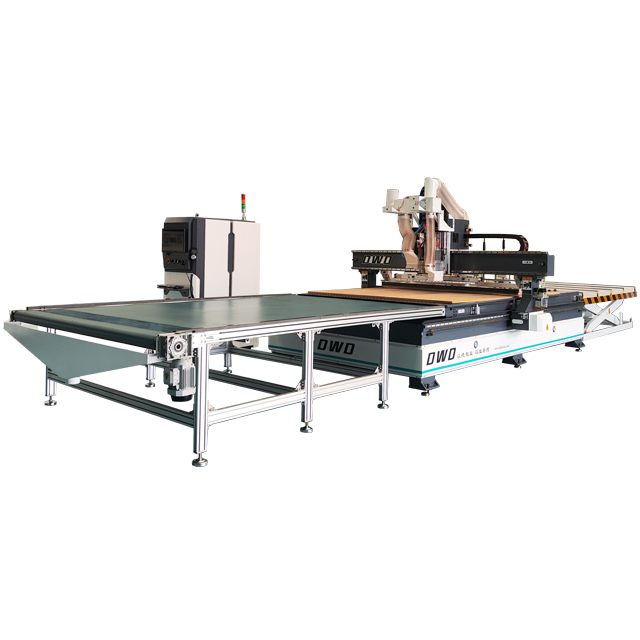
If you’re researching a Cabinets Making CNC Router or comparing a cnc router for cabinet making to traditional table-saw workflows, you’ll find the same theme throughout: the machine is only half the system. The other half is how you design, nest, label, and assemble so every panel lands where it should.
A CNC machine excels at cabinet work when your project uses sheet goods and repeatable parts. You can build:
Frameless cabinets (European-style): side panels, bottoms, tops, stretchers, shelves, and backs cut from full sheets with clean drilling patterns.
Face-frame cabinets: CNC-cut box parts plus separate face frames made traditionally—or face-frame parts cut on CNC if your workflow supports it.
Built-ins and pantries: tall carcasses, adjustable shelves, and consistent toe-kick layouts.
Garage and utility storage: durable sheet builds with fast production and simple finishes.
Where CNC shines most is in accurate hole placement (shelf pins, hinge plates, slide references) and repeatable joinery (dados, rabbets, pockets). If you plan carefully, you can flat-pack a full kitchen’s worth of parts, label them, and assemble them with fewer “measure twice” moments.
Cabinet success is often decided before the first sheet hits the spoilboard. Here’s the minimum toolkit to make CNC cabinet building predictable.
Work envelope sized for your sheets (or a plan for tiling/indexing if your machine is smaller).
Dust collection strong enough for sheet cutting—cabinet jobs generate a lot of chips.
Flat spoilboard surfaced and maintained so your Z-depth stays consistent across the sheet.
Reliable hold-down: vacuum, screws, or clamps—matched to your material and cut strategy.
Sheet goods: cabinet-grade plywood, melamine panels, MDF (often paint-grade).
Edgebanding: iron-on, pre-glued, or professional edging—choose early because it affects sizing.
Fasteners: confirmat screws, dowels, pocket screws, and/or glue depending on your joinery.
Hardware: hinges, slides, shelf pins, drawer pulls, adjustable legs or toe-kick parts.
Cabinet plan with clear dimensions and installation constraints.
Cut list and labeling system.
CAM strategy: tool library, feeds/speeds notes, and toolpath templates for repeatable jobs.
Most CNC cabinet workflows follow the same three-stage logic:
Design the cabinets and parts (dimensions, joinery, hole patterns).
CAM and nesting to arrange parts on sheets and generate toolpaths.
Cut + label parts so assembly is straightforward and errors are easy to catch early.
You can do this using general CAD/CAM or cabinet-focused software. General CAD is flexible when you’re building custom built-ins or unusual layouts. Cabinet-focused tools can speed up common tasks (toe-kicks, standard boxes, hole patterns) if you’re building cabinets regularly. Either way, the goal is the same: export accurate geometry and convert it into toolpaths that cut cleanly and repeatably.
“Looks good on screen” doesn’t guarantee “assembles perfectly.” CNC cabinet design should include manufacturing decisions up front.
Cabinet depths: keep consistent where possible (wall vs base vs tall) to reduce part variations.
Toe-kick plan: integrated toe-kick boxes vs separate toe-kick platforms.
Filler strategy: plan fillers for walls that aren’t perfectly square and for appliance clearances.
Dados/rabbets: CNC-friendly, strong, and self-aligning—great for consistency.
Screw-based carcasses (with pilot holes): fast and practical, especially for utility cabinets.
Hybrid approach: shallow dados for alignment plus screws for speed.
Cabinet accuracy often comes down to holes. Model or specify:
Shelf pin hole spacing and offsets
Hinge plate locations
Slide reference lines or drilling patterns
Back panel method (full back, captured back, nailers/rails)
Nesting is where you turn “parts” into “production.” Done well, nesting improves sheet yield, reduces tool time, and prevents part mix-ups.
Grain direction: keep visible panels aligned for a consistent look.
Part spacing: enough clearance for tool diameter, dust, and safe hold-down.
Label placement: engrave or mark part IDs where they won’t show after assembly.
Common geometry grouping: keep similar parts together to simplify sorting and assembly.
A reliable cabinet cutting sequence reduces part shifting and improves finish quality:
Drilling (shelf pins, hardware holes, pilot holes)
Pockets/dados (joinery features and recesses)
Profiles (outer cutouts last, so parts don’t move mid-job)
Edge cleanup (if needed, depending on tooling and material)
Tabs: keep parts attached until the end—great for smaller pieces.
Onion-skin: leave a thin layer and do a final pass to release.
Fasteners: screws in waste zones for non-vacuum setups.
Cabinets punish small inaccuracies. A minor calibration drift can become a door reveal problem or a drawer slide nightmare. Before your first real sheet:
Surface the spoilboard so your Z-depth is consistent across the cutting area. Then verify your tool length and Z-zero routine—especially if you change bits often.
If your machine uses homing switches, confirm it returns to the same home point reliably. For cabinet work, repeatability is often more important than speed.
Compression bit: often the best general choice for plywood to reduce tear-out on both faces.
Downcut: cleaner top surface, useful for melamine or veneer faces (watch chip evacuation).
Upcut: strong chip removal, useful for deeper pockets and some MDF work (can fuzz the top).
Drill/boring tools: if your setup supports them, they can speed up hole patterns.
Before cutting a full kitchen’s worth of parts, cut a test sheet that includes:
A dado or rabbet to check fit
Shelf pin holes to confirm alignment
One full cabinet side to confirm final dimensions
A sample hinge plate or slide pattern
Here’s a practical run you can repeat for each cabinet batch.
Measure wall lengths, ceiling height, and any obstacles (windows, outlets, plumbing, appliances). Identify the “never change” constraints first (appliance widths, sink base space, corner clearance). Then build your cabinet layout around standardized box sizes where possible.
Define each cabinet as a set of panels (sides, bottoms, tops, shelves, stretchers, back). Add toe-kick approach, back panel method, and hardware references. Keep a consistent naming convention so your CAM and labeling remain clean.
Set your sheet dimensions and actual thickness. Apply the recommended toolpath order (drill → pocket/dado → profile). Add tabs or onion-skin if your hold-down requires it. Include engraving for part IDs and orientation arrows if your workflow benefits from it.
Clean the spoilboard and confirm hold-down
Install the correct bit and verify it’s sharp
Set your X/Y datum (corner reference) consistently
Zero Z carefully (especially on veneered sheet goods)
Load your program and double-check tool assignments
Run drilling operations first, then dados/pockets, and cut profiles last. As parts release, keep them in order and label them immediately. If your CNC marks IDs, still confirm them with a manual label system—this is where assembly speed comes from.
Apply edge banding to visible edges before assembly (often easier while panels are flat). Trim and clean up edges. If you’re painting, sand and seal as needed—MDF edges especially benefit from proper prep.
Dry fit the first cabinet box of each “type” (base, wall, tall) to confirm joinery fit. Then assemble using your chosen method:
Dados/rabbets + glue for alignment and strength
Confirmat screws for fast, strong sheet-good joints
Pocket screws where appropriate (often for rails/stretchers)
Check for square on every box. A cabinet that’s slightly out of square can turn into a door alignment fight later.
Back design affects strength and installation. A captured back panel can add rigidity and help keep the box square. Nailers/rails can simplify wall mounting and provide strong screw zones.
A CNC can cut slab doors easily and can also cut frame parts, but many builders still prefer traditional methods for frame-and-panel doors. For drawers, CNC-cut parts can speed up production, but assembly and hardware setup still determine the final feel.
Installation is where “perfect parts” meet “imperfect walls.” Use shims and scribing where needed. Level bases first, then hang uppers, then align face edges and fillers. Finish by adjusting hinges and slides to achieve consistent reveals and smooth action.
Finishing is often the longest phase, so plan it like a mini workflow:
Pre-finished panels reduce finishing time dramatically (great for interiors).
Paint-grade builds require edge prep—especially on MDF.
Edge banding quality influences the final “built-in” look more than many people expect.
Keep finishing steps consistent across all cabinets to avoid mismatched sheen and color variation.
Switch to a compression or downcut strategy for clean top surfaces.
Use sharper tooling and reduce aggressive passes.
Check that your spoilboard is flat so your cut depth is consistent.
Confirm real material thickness; sheet goods vary.
Adjust your tool compensation strategy in CAM.
Replace worn bits—tool diameter drift shows up fast in joinery.
Standardize your datum and orientation for every sheet.
Make sure parts aren’t flipped during sorting—use labels and arrows.
Check machine homing repeatability if patterns drift over time.
Improve hold-down: vacuum integrity, screw zones, or clamping strategy.
Cut profiles last and consider tabs/onion-skin.
Reduce feed rate on the final pass if vibration is an issue.
A CNC router can be an excellent cabinet-building tool when you value repeatability and want to reduce manual layout work. It can speed up drilling patterns, help you produce consistent joinery, and make sheet processing more systematic.
But it’s important to be realistic: CNC doesn’t eliminate cabinet building labor—it shifts it. You trade some manual measuring and cutting for digital planning, machine setup, and organized labeling/assembly. For a one-time cabinet project, the biggest payoff often comes from accuracy and confidence, not just raw speed.
If you’re selecting a Cabinets Making CNC Router, prioritize features that support sheet work and repeatability. When comparing any cnc router for cabinet making, use this checklist:
Cutting area: Can it handle common sheet sizes without excessive repositioning?
Rigidity: Cabinet sheet cutting demands stability for clean edges and accurate holes.
Hold-down strategy: Vacuum or a reliable alternative that supports full-sheet processing.
Dust collection: Essential for consistent cuts and a safe, clean workspace.
Repeatability: Reliable homing and consistent datums for hole alignment and part matching.
Workflow compatibility: Software and file formats that fit your design-to-cut process.
Support and training: Documentation and learning resources reduce costly trial-and-error.
The “best” machine is the one that matches your cabinet volume and your willingness to standardize a workflow. For occasional builds, simplicity and reliability can beat advanced features you won’t use. For frequent cabinet work, efficiency features (toolpath templates, consistent hole systems, and streamlined nesting) become big time-savers.
ShopSabre: Treats CNC cabinet work as a complete workflow from planning through finishing, emphasizing repeatability and efficiency when cutting sheet goods.
Laguna Tools: Highlights learning through demonstration and structured steps, emphasizing software-driven cabinet workflows and practical training.
Vectric: Focuses on CAM efficiency—nesting, toolpath templates, and repeatable settings to speed up cabinet part production.
YouTube creators: Often emphasize real-world iterations—testing, tweaking settings, and refining workflows across full builds.
Reddit woodworking community: Shares pragmatic tradeoffs, noting that CNC can be rewarding but doesn’t remove the time needed for assembly, finishing, and installation.
Sawmill Creek forum: Discusses tradeoffs between general CAD/CAM flexibility and dedicated cabinet software efficiency.
Woodweb forum: Frames CNC cabinet making around throughput and shop economics, emphasizing cycle time and production planning.
eCabinet Systems: Highlights cabinet-focused generation of nested sheets and production-ready outputs for cabinet workflows.
Elevify training: Emphasizes toolpath sequencing, safe cutting practices, and practical methods that protect quality and tool life.
It depends on whether you want to cut full sheets in one setup. Full-sheet cutting is ideal for efficiency and accuracy, but smaller machines can still build cabinets using tiling/indexing—just expect more setup and careful referencing.
Yes, but it’s typically slower because you’ll need to process smaller panels and manage more repositioning. If you prioritize speed and fewer setup steps, a larger-format CNC is usually more comfortable for cabinet workflows.
A practical beginner-friendly approach is a hybrid: shallow dados for alignment plus screws for strength. It reduces assembly frustration while still taking advantage of CNC accuracy.
Many cabinet makers rely on compression bits for plywood because they can reduce tear-out on both faces. For melamine and veneered surfaces, a downcut strategy may help protect the top surface, depending on your setup.
Use sharp tooling, dial in feeds/speeds, and test cut settings on scrap. Clean hold-down and consistent spoilboard flatness also help because the cut depth stays stable across the sheet.
No. CNC can improve cut quality and reduce layout errors, but finishing remains a major part of the workload. Pre-finished panels can reduce finishing time significantly.
Once you understand the workflow, building cabinets with a CNC machine becomes a repeatable system: design with manufacturing in mind, nest efficiently, cut with the right sequence, label everything, and assemble square. Whether you’re upgrading a home or producing cabinets in a small shop, the right Cabinets Making CNC Router and a disciplined process can help you deliver consistent fits, cleaner drilling patterns, and more predictable results.
If you’re choosing a cnc router for cabinet making, focus on sheet capacity, rigidity, hold-down, dust control, and repeatability—because in cabinet work, small errors multiply. Start with a test cabinet, refine your templates, and you’ll quickly build a workflow that scales from one cabinet to many.