close
Choose Your Site
Global
Social Media

Views: 0 Author: Site Editor Publish Time: 2025-12-12 Origin: Site
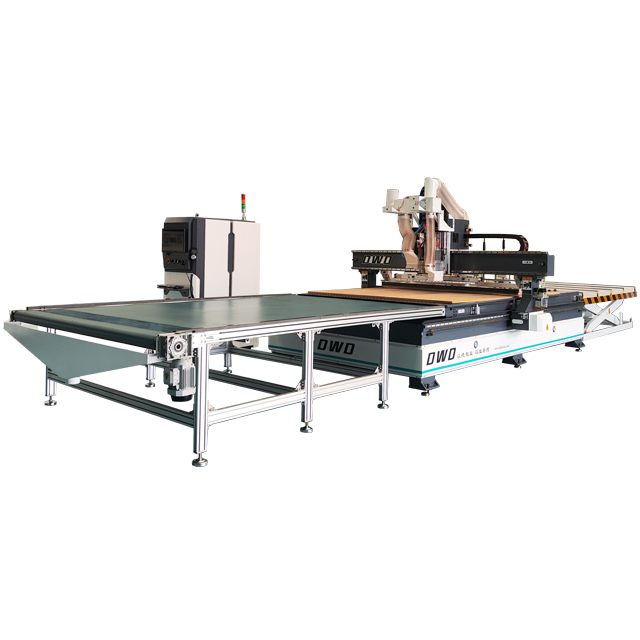
Cabinet shops don’t lose money because they can’t build cabinets. They lose money because time leaks out of the process—parts get re-cut, holes don’t line up, sheet goods get wasted, and “custom” turns into chaos when repeatability isn’t built into the workflow. That’s why more shops are treating a Cabinets Making CNC Router as a production system, not just a machine. It’s a way to protect margin while delivering faster lead times, cleaner fit, and consistent quality that customers can feel the moment a drawer slides or a door closes.
In a traditional shop, growth often means adding labor, expanding floor space, or accepting longer lead times. A CNC router changes that equation. It converts skilled effort into a repeatable process: the same cabinet side, the same toe-kick notch, the same hinge pattern—cut and drilled the same way every time. Instead of paying for mistakes with rework and scrap, the shop pays for predictability.
The ROI is rarely a single “magic” feature. It’s the accumulation of small wins—fewer do-overs, faster setups, better use of materials, and smoother assembly. Over hundreds of cabinets, those wins compound into real capacity.
A CNC router is best understood as a precision cutting-and-drilling platform controlled by CAD/CAM files. In cabinet work, that means sheet goods and components are processed with repeatable geometry and consistent hole placement. The result is a workflow that feels more like manufacturing and less like improvisation.
Repeatable cutting: Panels, shelves, stretchers, and face-frame elements come off the table with consistent sizing.
Repeatable drilling: Shelf pins, hinge cups/plates, connector holes, and slide patterns land exactly where the assembly expects them.
Repeatable planning: Nesting, part labels, and standardized libraries reduce decision fatigue and errors.
In other words, the CNC router turns “tribal knowledge” into a documented process the whole team can run.
Most cabinet shops don’t want to “get bigger” just to get busier. They want higher output with the same team and consistent quality. A Cabinets Making CNC Router supports that by removing bottlenecks that traditionally consume time:
Batch cutting parts instead of measuring and ripping one job at a time
Automating hole patterns so drawers and doors fit without trial-and-error
Reducing layout time with digital templates and reusable programs
When cutting and drilling become predictable, your skilled people can focus on higher-value work: assembly speed, edge banding quality, finishing consistency, and installation readiness.
Cabinetmakers know the hidden cost of “almost right.” A panel that’s off by a couple millimeters might still be usable—but it will fight the build all day. Repeatability is where CNC earns its reputation in cabinetry: parts align, reveals stay consistent, and hardware installs the way it should.
Precision doesn’t just mean “tight tolerances.” It also means standardized outcomes. Once a hinge pattern is verified, it stays verified. Once a drawer box clearance is dialed in, it stays dialed in. Over time, this reduces callbacks and helps the shop build a dependable brand reputation.
Sheet goods are one of the biggest cost drivers in cabinet production, and waste is often the quiet profit killer. CNC workflows can reduce waste in two ways:
Nesting optimization: Planning parts to fit efficiently on each sheet increases yield.
Fewer mistakes: Digitally verified cutting paths reduce scrap from measurement errors and incorrect layouts.
Even when your material prices fluctuate, improving utilization makes quoting more stable. That means fewer “just in case” buffers and more confidence when you bid on larger jobs.
Customers love customization—until it turns your shop schedule into a mess. CNC changes how you handle variation. Instead of reinventing the wheel each time, you can create a cabinet library of proven components and rules, then swap dimensions, door styles, cutouts, and hardware options without rebuilding the entire workflow.
This is where making cabinets with cnc router becomes a strategic advantage: you can offer more options while keeping production disciplined. The customer sees “custom.” You see “controlled variation.”
Cabinet customers don’t just compare prices. They compare timing, communication, and how confident you sound when you promise a finish date. CNC supports competitiveness by making your schedule more reliable. When parts are consistent and production is planned digitally, lead times become less dependent on individual heroics.
Over time, that reliability becomes a differentiator—especially for builders, designers, and commercial clients who need repeatable outcomes.
A CNC doesn’t automatically create efficiency. A workflow does. Here’s a cabinet-focused structure many shops follow to keep output stable while improving quality.
Start with rules: panel thickness, reveal standards, toe-kick height, shelf-pin spacing, and hardware clearances. Then build a library of cabinet types (bases, uppers, tall units) that match your brand’s standards. This creates consistency across jobs and makes training easier.
CAM is where efficiency is designed. Your toolpaths define cut order, hole operations, and edge quality. Your nesting rules determine material utilization and production flow. Good nesting considers grain direction, part priority, and labeling so the shop can kit parts by cabinet or by room.
Typical cabinet operations include:
Panel profiling (sides, bottoms, shelves, stretchers)
Dadoes/rabbets for quick alignment and strength
Shelf-pin holes with consistent spacing
Hinge patterns and hardware pilot holes
Vent/cutouts for appliances, sinks, or cable management
The goal is to reduce manual marking and drilling—these are high-error steps in many shops.
Parts that look similar cause expensive mistakes. Labeling is not optional in a busy shop. A strong system includes part names, cabinet ID, edge banding notes, and orientation markers. When kitting is clear, assembly becomes faster and less stressful.
Use a repeatable QC routine: verify critical dimensions, confirm hole patterns against hardware, and test-fit a “golden cabinet” when you introduce a new design. If you run edge banding, define which edges are banded in the digital plan to reduce missed steps and rework.
If cabinetry is your core business, buy the CNC router the way you’d buy a production system: based on your workflow, your materials, and your volume.
Full-sheet capacity: A 4x8 table supports standard sheet goods workflows.
Oversized options: Larger beds can improve flexibility for longer parts and higher throughput.
Cabinet work often relies on vacuum hold-down for sheet goods. Strong, consistent vacuum improves cut quality and safety—especially on smaller nested parts that can shift during cutting.
Cabinet production often uses multiple tools: a compression bit for clean edges, a smaller bit for tight corners, and dedicated drills or cutters for specific operations. Automatic tool changing can reduce downtime and keep batch runs efficient, especially when drilling patterns and profiling are combined.
For shops producing volume, cabinet-friendly drilling features (or optimized drilling routines) can reduce cycle time and improve shelf-pin and hardware consistency.
In real-world cabinet production, software compatibility and support matter as much as spindle specs. A smooth workflow includes stable post-processors, predictable toolpath behavior, and accessible troubleshooting when deadlines are tight.
ROI is a math problem, not a vibe. Most cabinet shops see payback from a combination of factors:
Labor efficiency: fewer hours spent measuring, marking, and re-cutting
Reduced rework: consistent hole placement and part sizing
Lower material waste: nesting and fewer cutting mistakes
Higher throughput: more cabinets per week without sacrificing quality
New revenue opportunities: faster turnaround and broader customization options
A practical approach is to compare your current weekly output and scrap rate to a target future state. If the CNC helps you ship even a few more cabinets per week—or prevents a few expensive rework cycles per month—the numbers often start to make sense quickly.
Buying the machine before planning the workflow: solve your file flow, labeling, and kitting early so the CNC doesn’t become an island.
Underestimating training time: schedule a ramp-up period for programming, tooling, and QC routines.
Weak dust collection and maintenance habits: cabinet production is dusty; airflow and cleanup protect accuracy and uptime.
Overbuying complexity: the “best” router is the one your shop can run consistently, not the one with the most features.
Techno CNC: focuses on boosting capacity and consistency while reducing waste, helping shops grow without relying entirely on added labor.
ShopSabre: emphasizes repeatability, fewer human errors, and productivity gains that improve cabinet quality and throughput.
Scarlett: highlights versatility, efficiency, and the ability to handle custom work with more predictable outcomes.
DMS: frames CNC as a shift in how cabinets are produced—more scalable output, stronger ROI, and controlled quality.
CNC Works: points to speed and accuracy for custom cabinetry, with productivity advantages when the workflow is well planned.
Reddit CNC community: discusses practical decision factors like support, vacuum performance, software fit, tooling strategy, and choosing the right machine for your budget.
Reddit woodworking community: often connects CNC adoption to higher-end expectations for fit and finish while recognizing the cost and workflow trade-offs.
The learning curve is real, but manageable with a system. Start with a limited cabinet library, standardize hardware patterns, and build repeatable CAM templates. Most shops improve fastest when they focus on consistency before complexity.
Many cabinet workflows are built around full sheet goods, so a table that supports standard sheets is typically the baseline. The best size depends on your shop volume, space, and whether you want to process oversized parts or run higher-throughput nesting strategies.
Not strictly, but it can be a major efficiency upgrade for production. If your workflow routinely uses multiple tools per sheet—profiling, pocketing, drilling, and finishing passes—automatic tool changing can reduce downtime and keep batch runs moving.
Nesting organizes parts efficiently on each sheet while respecting grain direction, part priority, and machining requirements. Better nesting generally means more usable parts per sheet and fewer leftover scraps that can’t be reused.
Yes—if the shop targets consistency, lead time, and controlled customization. Small shops often benefit from reduced rework and improved predictability even before they “need” higher volume, because efficiency and quality improvements protect profit on every job.
A CNC router isn’t a shortcut to craftsmanship—it’s a way to make craftsmanship repeatable. For cabinet shops, the real value of a Cabinets Making CNC Router is control: control over dimensions, hole patterns, waste, and schedule reliability. When you build a workflow around standards, labeling, and disciplined CAM practices, making cabinets with cnc router becomes less about “running a machine” and more about running a profitable, scalable cabinet business.